Your client's side
Received a note sent with Flow?
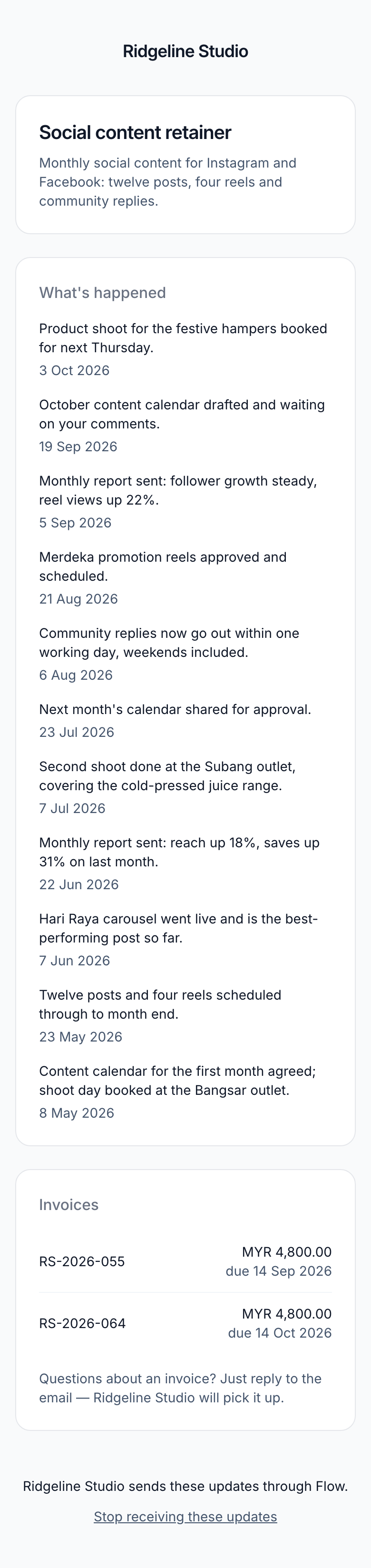
An agency or studio you work with sends you these notes using Flow. Each note tells you what has moved on your project, and anything you owe them.
What it's for
This page explains where the note came from and what you can do with it. You can look at your project, stop the notes, or start them again.
Last updated
Who can do this: This page is for clients of agencies that use Flow.
Who sent it
The note carries the agency's name, and it's about work they're doing for you. Flow is the software that sends it for them on a regular schedule.
To answer it, reply to the note. If the agency has set a reply address, your reply goes to them. If you're not sure, contact them the way you usually do.
Open your project page
Your project page lists every update the agency has sent you, and any invoices still owed. You don't need an account or a password.
- Click "See the full picture" at the bottom of the note.
- Type the email address the notes come to, then click "Email me a code".
- Open the email with your code. It's 6 characters long.
- Type the code under "Your code", then click "See the update".
The code works for 20 minutes. If it doesn't work, click "Send a new code" and ask for another. Once you're in, you stay in on that device for 14 days.
What the note never asks for
The note and the project page never ask for a password, because there isn't one. They never ask for your card or bank details. You never have to sign up or download anything.
A note may have a "Pay online" link. It goes to the agency's own payment page. Flow doesn't take payments.
Stop the notes
- Open any note about the project.
- Click "Stop receiving these" at the bottom.
A page opens saying "You're unsubscribed". You get no more notes about that project from then on. Notes about other projects with the same agency carry on. Each has its own stop link.
You can also click "Stop receiving these updates" at the bottom of your project page.
Once you've stopped the notes, the project page won't send you a new code.
Marking a note as spam stops the notes too. It stops them for every project with that agency, and it can't be undone.
Start them again
Nobody can start the notes again without you. If you used the stop link, the agency can send you one email asking if you want them back.
- Ask the agency to send you the link, if they haven't already.
- Open the email and click "Resume updates".
- On the "Get updates again?" page, click "Yes, send me updates".
You'll see "You'll get updates again". The notes start with the next one the agency sends.
The link works for 14 days and only once. An old or used link shows "This link no longer works", and nothing changes. The agency can send this email once each time you stop the notes.
If you'd rather not have the notes back, ignore the email. Nothing changes.
If you marked a note as spam, the notes can't be started again.
Your data
Flow handles your name and email address for the agency, to send these notes. Read our Privacy Policy, or email marshal.yung@gaiaco.io with a privacy question.
Related
-
How clients see their project page
How clients open their project page with a code, and how to help.
-
How Flow works
The words Flow uses, and what happens each time a note is due.
Still stuck? Email marshal.yung@gaiaco.io.