Start here
How Flow works
Each client project or retainer is an engagement. You add who should hear about it and what they owe. Flow emails them a short note on a schedule, and the note gets firmer as an invoice runs late.
What it's for
Read this first, so the words on every other page make sense. It also shows what Flow does for you while you get on with the work.
Last updated
The words Flow uses
| Word | What it means |
|---|---|
| Engagement | A client project or retainer you want the client kept up to date on. |
| Active engagement | An engagement that's still going. Your plan sets how many can be active at once. Completed, cancelled, on-hold and archived ones don't count. |
| Client | The company you work for. It holds its contacts and its engagements. |
| Contact | A person at the client, with an email address. |
| Recipient | A contact who gets the notes about one engagement. |
| Update | One or two plain sentences about what moved. Flow keeps it for the next note. |
| Invoice | A record of an invoice you've already sent from your own accounting tool, with the amount and due date. Flow mentions it until you mark it paid. |
| Note | The email Flow sends your client, in your agency's name. |
| Cadence | The schedule notes go out on: every so many days, at an hour you choose. |
| Firmness | The tone of the note. It gets firmer when an invoice is 14 days overdue, and again at 30. |
| Project page | A page about one engagement that the client can read but not change. They open it with a code sent to their email, with no account to create. |
What happens when a note is due
You don't need to be signed in. At the hour you've set, Flow does the following:
- It gathers the updates you've recorded since the last note, and any invoices still unpaid.
- It picks the tone from the most overdue invoice: neutral, firm or final.
- It writes the note, with what moved first and what's owed after.
- It sends the note to everyone on the engagement who still gets notes.
- It sets the date of the next note.
If nothing has moved and nothing is owed, Flow skips that note. Your client never gets an empty email. Every note, sent or skipped, is listed in the engagement's history.
See it on one of your engagements
- Click the folder icon in the top bar to open "Engagements".
- Click the name of an engagement.
- Click "See the next note".
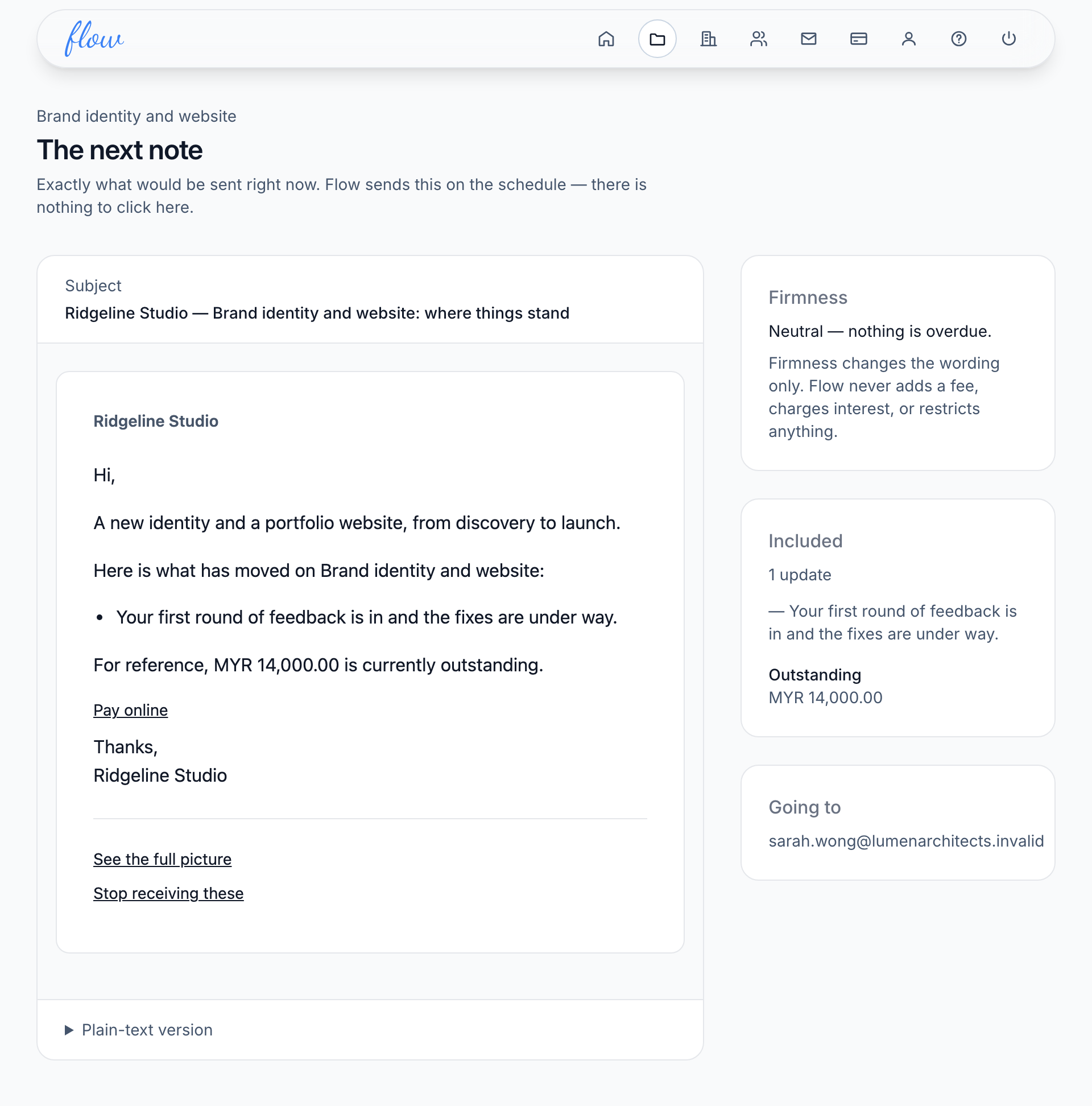
This is exactly what Flow would send right now. You don't need to press anything here. More in Preview the next note.
What Flow doesn't do
Flow follows up on your projects and invoices until they're paid. It keeps out of the rest of your work.
| Flow doesn't | What to do instead |
|---|---|
| Manage projects or tasks | Keep using your project tool. |
| Create invoices or take payments | Raise and collect them where you do today. Flow follows them up. |
| Give clients a portal to log into | Clients get a code by email to open their project page. |
| Add late fees | Flow only makes the wording firmer. It never adds a fee or interest. |
Related
-
Start your trial
Create your account, set up your agency and start the 14-day trial.
-
Your first engagement
Add your first engagement, its client and the invoice they owe.
-
How reminders get firmer
Neutral, firm at 14 days overdue, final at 30. Never a fee.
Still stuck? Email marshal.yung@gaiaco.io.