Account
Deliverability
Deliverability shows whether the email Flow sends for you is arriving. It covers the last 30 days, and lists recent messages that went wrong.
What it's for
Use it to catch a wrong address or a note marked as spam, before a client tells you they never heard from you.
Last updated
Who can do this: Owners only. Members don't see Deliverability in the top bar.
Open Deliverability
- Click "Deliverability" in the top bar. Point at the icons to see their names.
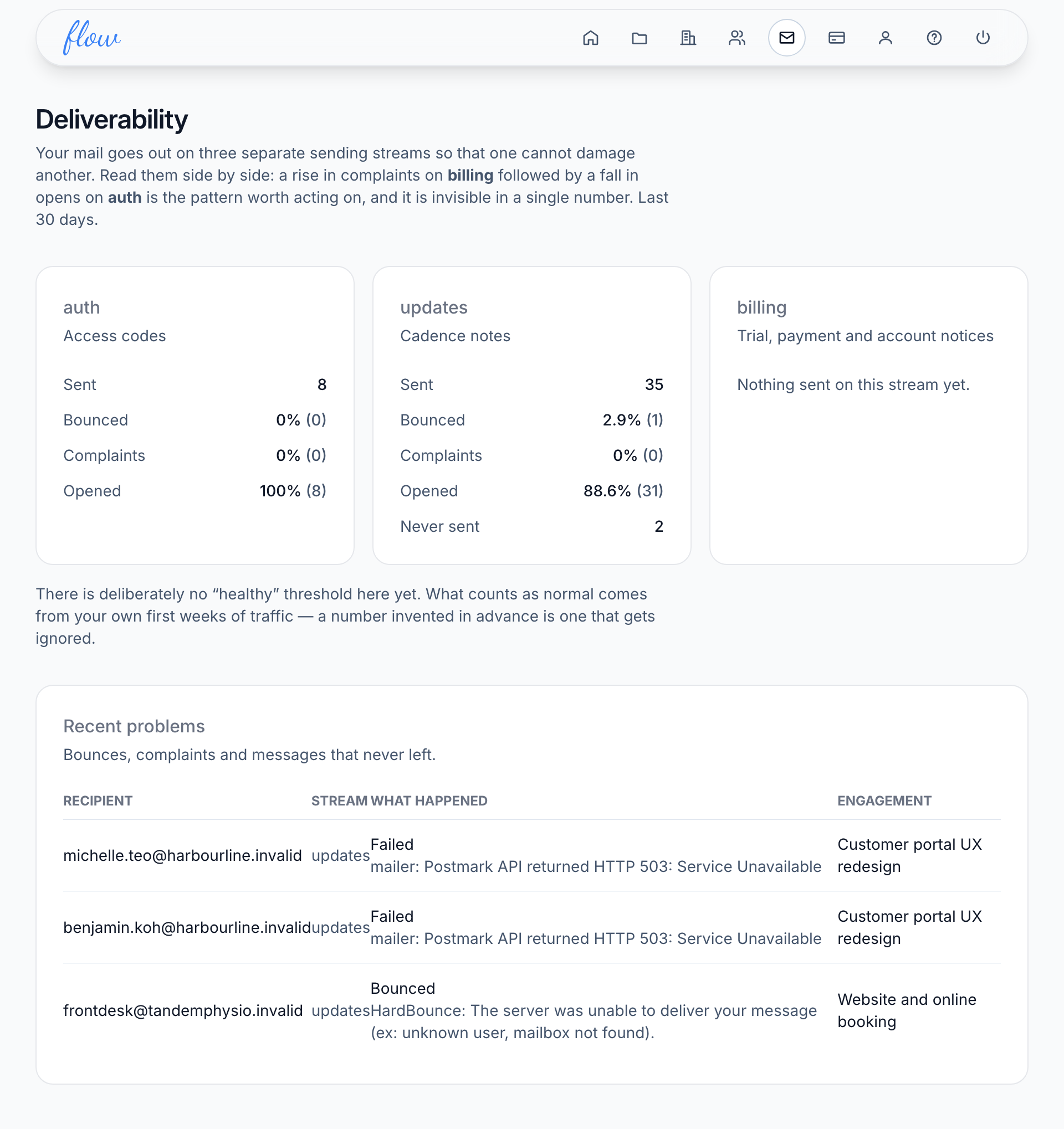
- Read the three boxes side by side, one for each kind of email.
- Scroll down to "Recent problems" to see the messages that went wrong.
The three kinds of email
Flow sends three kinds of email, each from its own address. That way, trouble with one kind can't stop the others arriving. Each box has a short name at the top:
| Box | What it covers |
|---|---|
| "auth" | Access codes: the short codes your clients type to open their project page. |
| "updates" | Your notes to clients, and any email asking a client to start getting them again. |
| "billing" | Flow's emails to you about your own Flow plan, such as a trial ending or a payment that failed. |
A box may say "Nothing sent on this stream yet". That means Flow hasn't sent that kind of email in the last 30 days, so there's nothing to measure.
Reading the numbers
| Line | What it means |
|---|---|
| Sent | How many messages left Flow. |
| Bounced | Messages that could never be delivered, such as to an address that doesn't exist. A full mailbox or an out-of-office reply doesn't count. |
| Complaints | Messages someone marked as spam. |
| Opened | Messages someone opened. Treat it as a rough guide: some email apps report every message as opened, and some never report it. |
| Never sent | Messages that failed to leave Flow. This line only appears when there are some. |
Each percentage is out of the messages sent, and the number in brackets is the count.
Flow doesn't say what a good rate is. Your own first few weeks show what's normal for you. After that, look into any box where bounces or complaints go up, or opens drop, compared with usual.
Fix a recent problem
"Recent problems" lists the latest 20 bounces, complaints and messages that never left. Each row shows the address, the kind of email, what happened and the engagement it was about. An engagement is one client project or retainer.
A bounce usually means the address is wrong. To fix it:
- Ask your client for the right address.
- Open the client and add the right address with "Add contact".
- Click the engagement's name in the "Recent problems" row.
- Click "Cadence", choose the new contact under "Add a recipient" and click "Add".
- Click "Remove" beside the old address.
A complaint on "updates" means someone marked your note as spam. Flow then stops sending them notes from your agency, on every engagement. This can't be undone. A complaint on "auth" or "billing" doesn't stop your notes. Talk to them directly if you need to reach them.
More about recipients is in When notes go out.
Related
-
When notes go out
Set how often each client gets a note, and who receives it.
-
Clients and contacts
Add clients and the people who get the notes; see how fast each client pays.
-
Note history
Every note sent, skipped or failed, and what happened to it.
Still stuck? Email marshal.yung@gaiaco.io.