The note
Note history
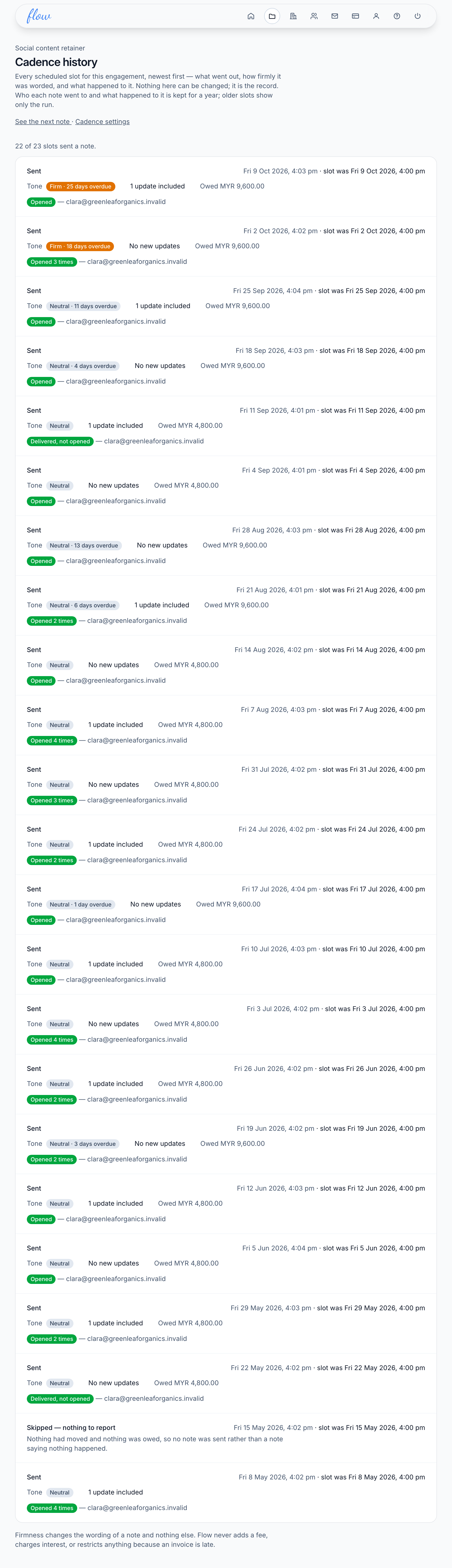
The history lists every time a note was due on an engagement, newest first. It shows the notes that went out and the ones that didn't, with the reason. Nobody can change it.
What it's for
Check that a client really was sent a note, and whether they opened it, before you chase them yourself.
Last updated
Open the history
- Open the engagement.
- Click "History". The page is called "Cadence history".
- Read down from the top. The newest note is first.
On the Cadence screen, the same page is linked as "See what already went out".
Reading a row
Each row is one time a note was due. It shows the outcome first, with the reason under it when there is one.
The time is in your agency's timezone. If the note went later than planned, the planned time is shown too.
A sent note also shows its "Tone", how many updates it carried, and what was "Owed" in each currency. "No new updates" means the note was only about money owed.
Below that, each person it went to has their own line, saying what happened to their copy.
What each outcome means
| Outcome | What it means |
|---|---|
| "Sent" | The note went to at least one person. |
| "Skipped — nothing to report" | Nothing had moved and nothing was owed, so Flow didn't send an empty note. |
| "Skipped — over your plan's limit" | This is one of your newest engagements and you were over your plan's limit. |
| "Skipped — no recipients" | Nobody was on the engagement. |
| "Skipped — everyone unsubscribed" | Everyone on it had stopped the notes. |
| "Skipped — addresses can't receive mail" | Our mail provider wouldn't send to any address on it. |
| "Failed" | Nothing went out. The reason is shown under it. |
| "Not finished" | Flow started this note and recorded no result. After a minute, it means nothing was sent. |
Notes skipped for these reasons aren't sent later. The next one goes at the next time on the schedule.
What happened to each copy
| Label | What it means |
|---|---|
| "Sent, no delivery confirmation yet" | Our mail provider took the email and hasn't reported back. It doesn't yet mean it arrived. |
| "Delivered, not opened" | It reached their inbox. |
| "Opened", or "Opened 3 times" | It was opened, or their email app loaded it. |
| "Bounced" | It couldn't be delivered to that address. |
| "Marked as spam" | They reported it as spam. They no longer get your notes. |
| "Not sent yet" | It's waiting to go to our mail provider. |
| "Failed to send" | It never left. |
Treat opens as a rough guide. Some email apps, such as Apple Mail, load every email whether or not it's read. Others block the tiny image that counts an open. Look for changes over time, not the exact number.
No history yet
A new engagement says "No notes have gone out yet". Under that, it gives the reason. The engagement may not be active, or its notes may be switched off. Otherwise it gives the date the first note is due.
How long it's kept
Who each note went to, and what happened to it, is kept for a year. After that, the row no longer lists anyone. A sent note then says "No delivery record was kept for this note."
Related
-
Preview the next note
See exactly what Flow would send right now, before it goes.
-
When notes go out
Set how often each client gets a note, and who receives it.
-
Deliverability
Check that the email Flow sends for you is arriving, and fix what isn't.
Still stuck? Email marshal.yung@gaiaco.io.